New · Early access

Small Business. Big Intelligence.

pTinksOS by AI Ops Foundry

Leads, bookings, sales, client marketing and a team of AI agents in one place, built for contractors, home-service pros, barbershops and salons. The AI drafts every message. You approve it before anything goes out.

Free during early access. No credit card. See pricing.
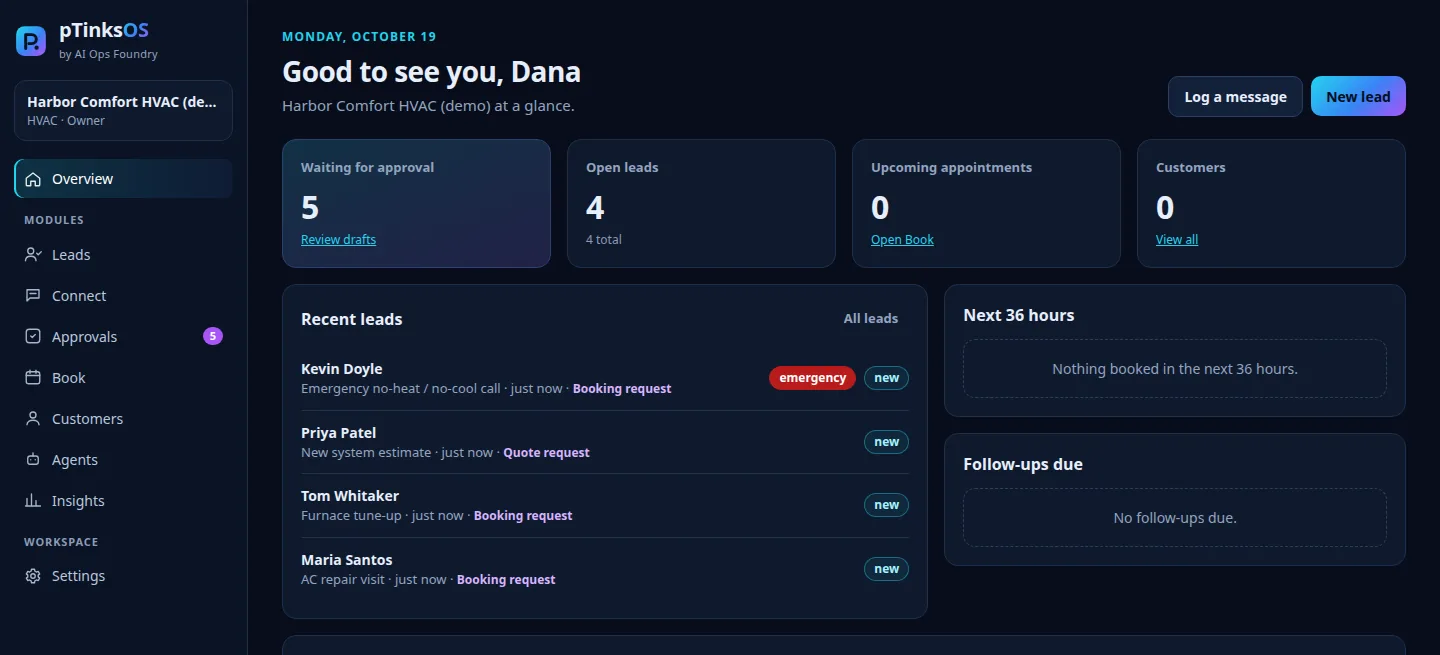
pTinksOS overview screen showing drafts waiting for approval, open leads, upcoming appointments and recent leads with an emergency flag
The pTinksOS overview in a demo workspace with sample data.
birdieOS

Run a golf studio? Meet birdieOS.

Golf instructors, studios and academies now have their own version: birdieOS by AI Ops Foundry. Lesson booking, packages and credits, cancellation recovery with your approval, and the same plans and prices.

See birdieOS for golf
Online booking

Your own booking page at reserved4u.app.

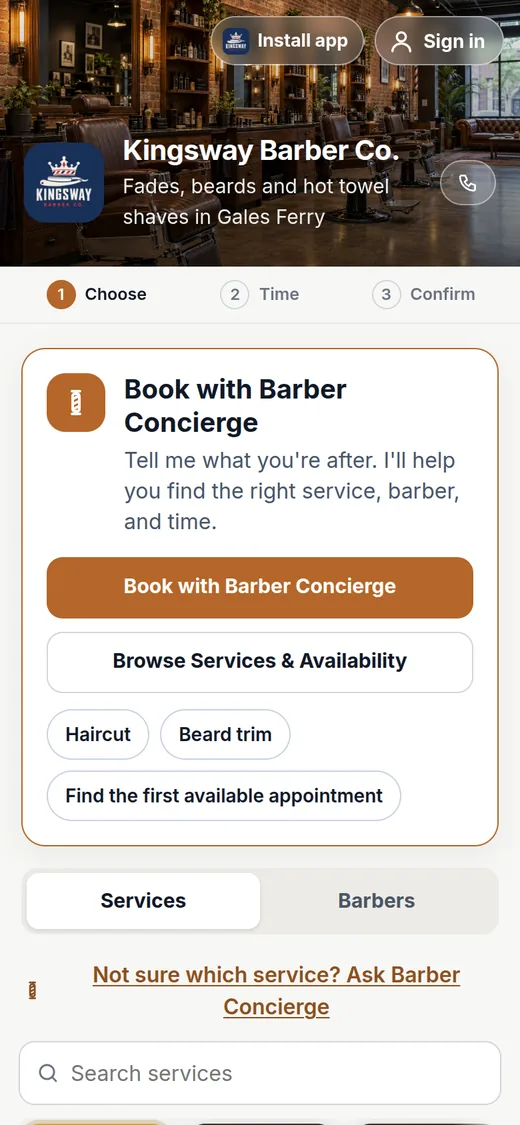
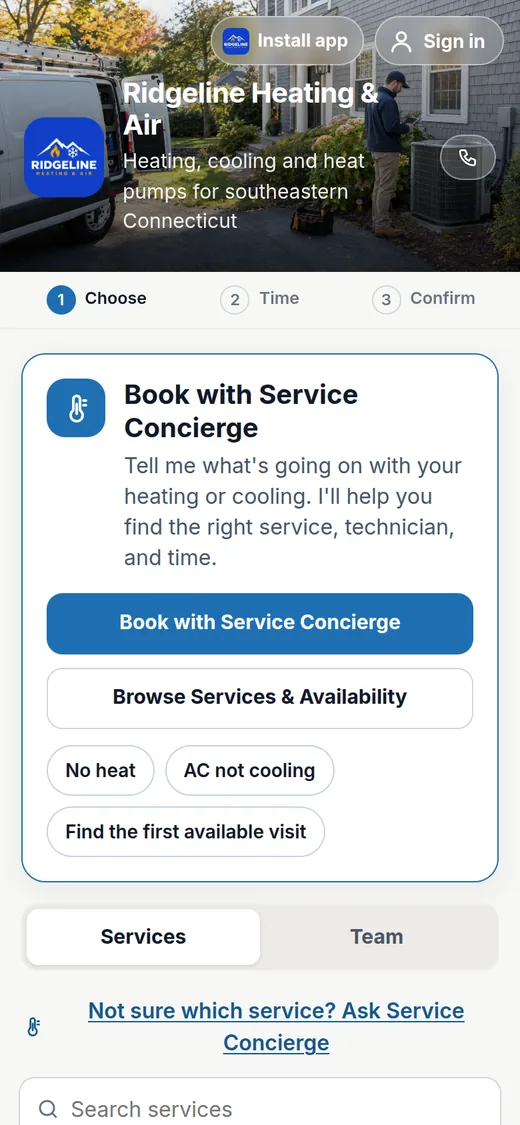
Every pTinksOS business gets a booking page made from its name. Customers choose a service, a team member and a time from any phone or computer, or let Concierge guide them. You can change your link in your booking website settings.
reserved4u.app/your-business
Kingsway Barber Co. booking page on a phone with Barber Concierge, services and barbers
Kingsway Barber Co.
Ridgeline Heating & Air booking page on a phone with Service Concierge and quick picks for no heat and AC not cooling
Ridgeline Heating & Air
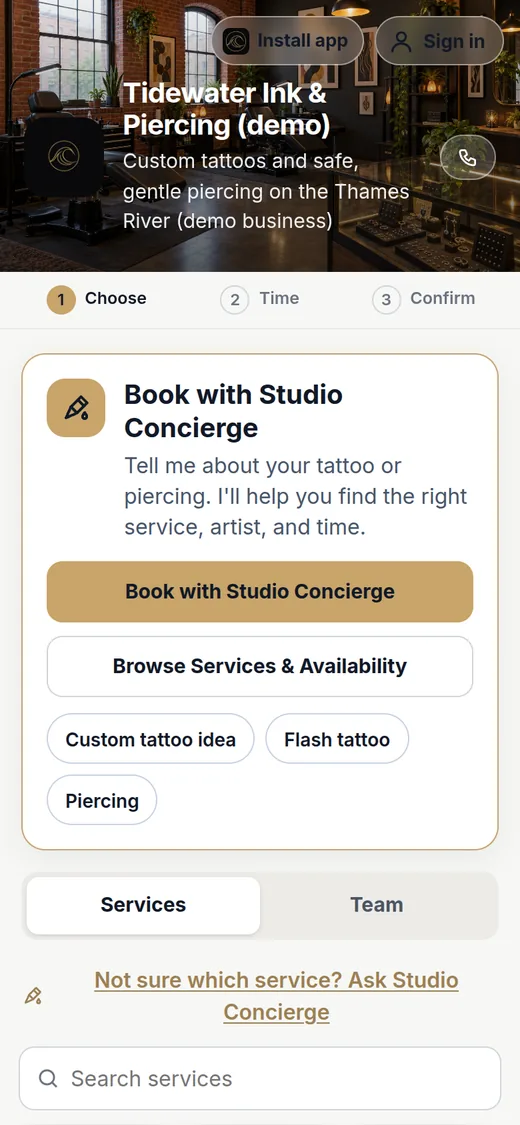
Tidewater Ink & Piercing booking page on a phone with Studio Concierge and custom tattoo, flash and piercing options
Tidewater Ink & Piercing

These are demo businesses with sample services and team members. Running a golf studio? Try the Fairway Lab demo on birdieOS.

What it does

Stop losing leads to slow replies.

Everything shares one customer list, so nothing falls through the cracks between a call, a booking, a sale and a follow-up.

pTinksOS Leads

Every inquiry in one list

Phone calls, web requests, walk-ins and referrals land in one place with status, follow-up dates, notes and a one-click convert to customer.

LeadRescue agent

Sorted and drafted in seconds

LeadRescue labels each message (quote, booking, reschedule, complaint, question or spam), flags emergencies and writes a reply for you to review.

Human approval

Nothing sends without you

AI drafts wait in Approvals. An owner or manager approves, edits or rejects each one. pTinksOS never contacts a customer on its own.

pTinksOS Book

No double-bookings

Set services and each person's hours. pTinksOS blocks overlapping appointments and bookings outside working hours before they're saved.

pTinksOS Connect

A request form you can share

Each business gets its own request link with a consent checkbox and spam protection. New requests become leads and get a draft reply.

pTinksOS Insights

Numbers from your real records

Lead volume, conversion, average first-response time, booking counts and agent activity, calculated only from your own data.

pTinksOS Sales

Ring up every job and visit

Record Visa, Mastercard, AMEX, Discover, Apple Pay, Google Pay, PayPal, Venmo, Cash App Pay and cash from the terminal you already use. Split payments, tips, tax, refunds and a daily close.

Client marketing

Campaigns for customers who said yes

Email and text campaigns go only to customers who opted in. Marketing Writer drafts them, a manager approves each one, and every message carries an unsubscribe option.

Automations and agents

Follow-ups that run themselves

Reminders, review requests, rebooking nudges and a daily briefing. Set the rules once; anything that would reach a customer waits for approval.

See it in action

Human approval

AI writes the draft. You hit send.

LeadRescue reads each message, labels it and writes a reply in your business's tone using only the facts you give it.
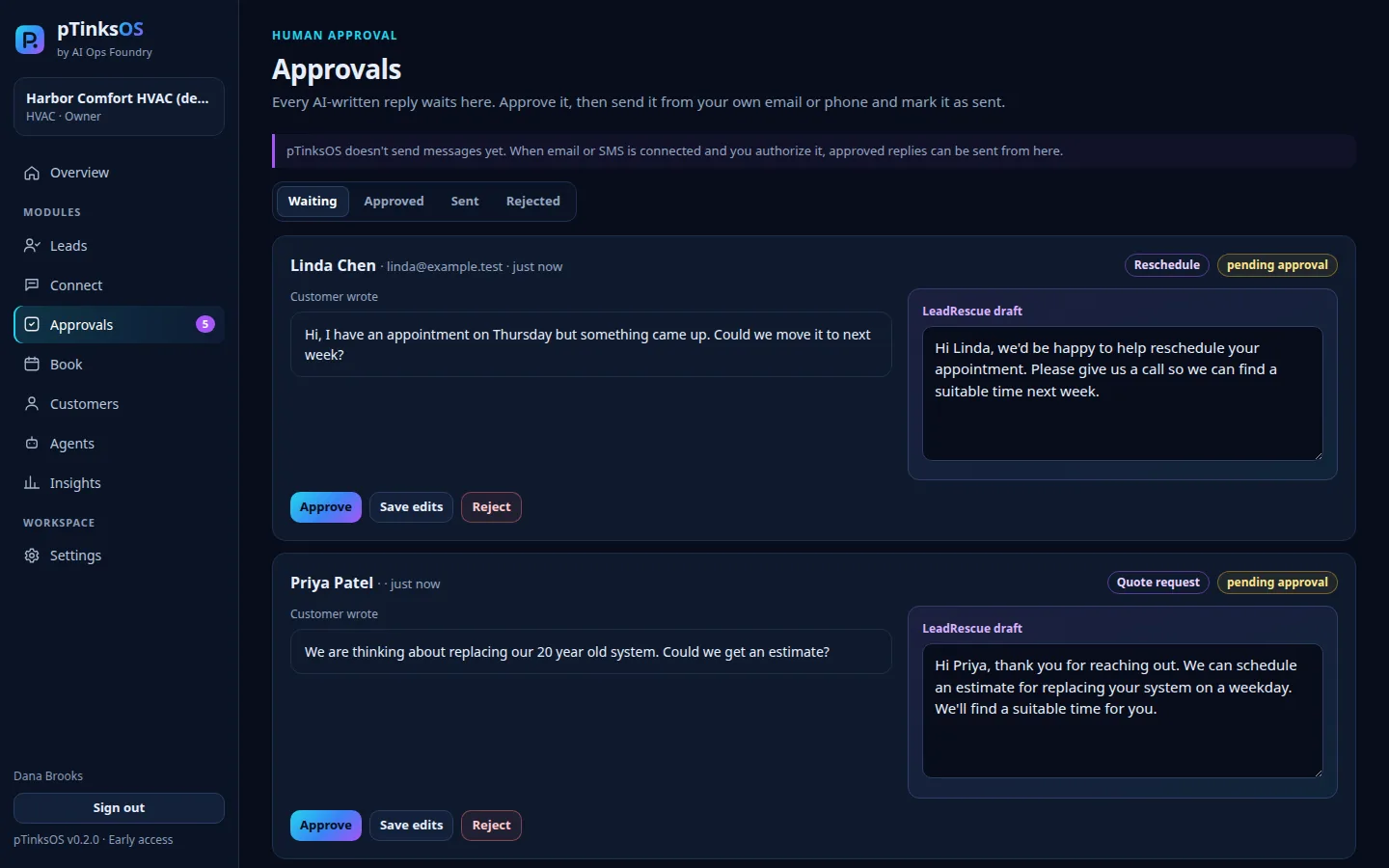
  • Edit before approving. Change any word, then approve or reject.
  • Role controls. Staff can draft; only owners and managers approve.
  • Full history. Every approval is in the audit log.
pTinksOS Approvals screen with two customer messages, each with a LeadRescue draft reply and Approve, Save edits and Reject buttons
Approvals: each AI draft waits for a person.
Bookings

A schedule that protects itself.

Book from a lead or from scratch. pTinksOS checks the team member's hours and existing appointments on the server before saving.
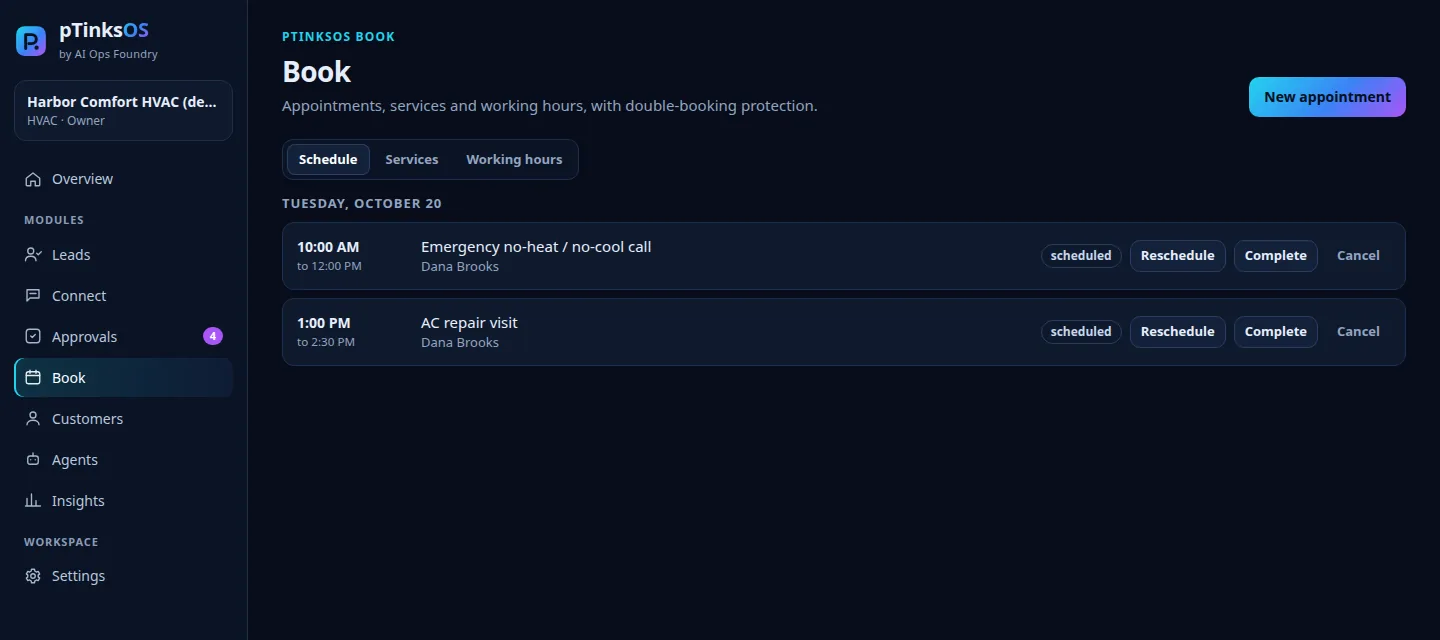
  • Overlap blocked. You'll see exactly which appointment it conflicts with.
  • Hours respected. Owners and managers can override hours, never overlaps.
  • Your time zone. Times show in the business's local time.
pTinksOS Book screen listing two scheduled appointments with Reschedule, Complete and Cancel actions
Book: appointments with double-booking protection.
Insights

Know what's working.

See new leads per day, your pipeline, conversion, how fast you respond and what LeadRescue did. No estimates, no sample numbers.
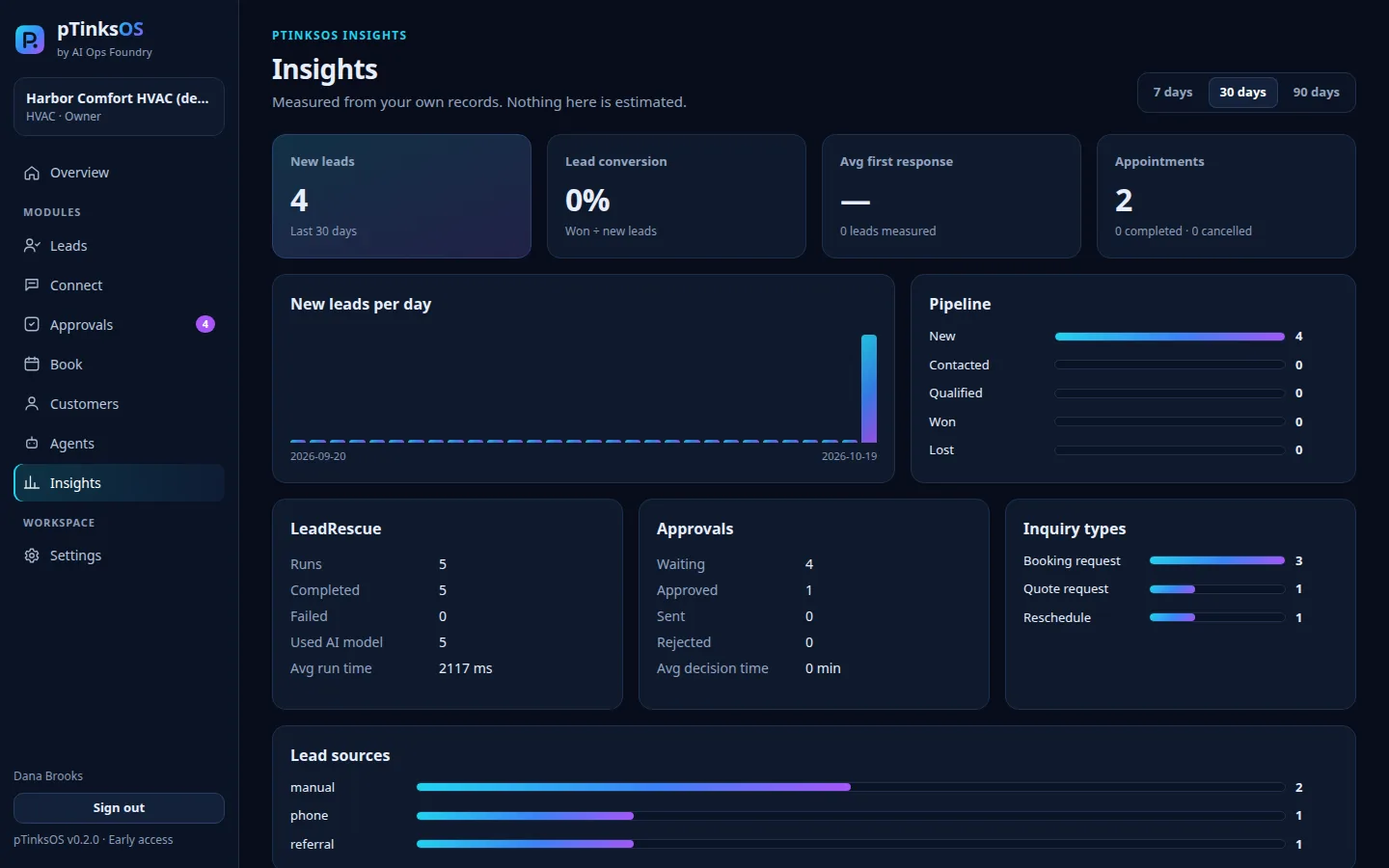
pTinksOS Insights screen with new leads per day, pipeline, LeadRescue runs, approvals and inquiry types
Insights from a demo workspace's records.
Sales

See today's revenue at a glance.

Revenue is money actually collected (payments minus refunds) by your business day. Track average ticket, tips, open balances, payment mix, top services and team performance.
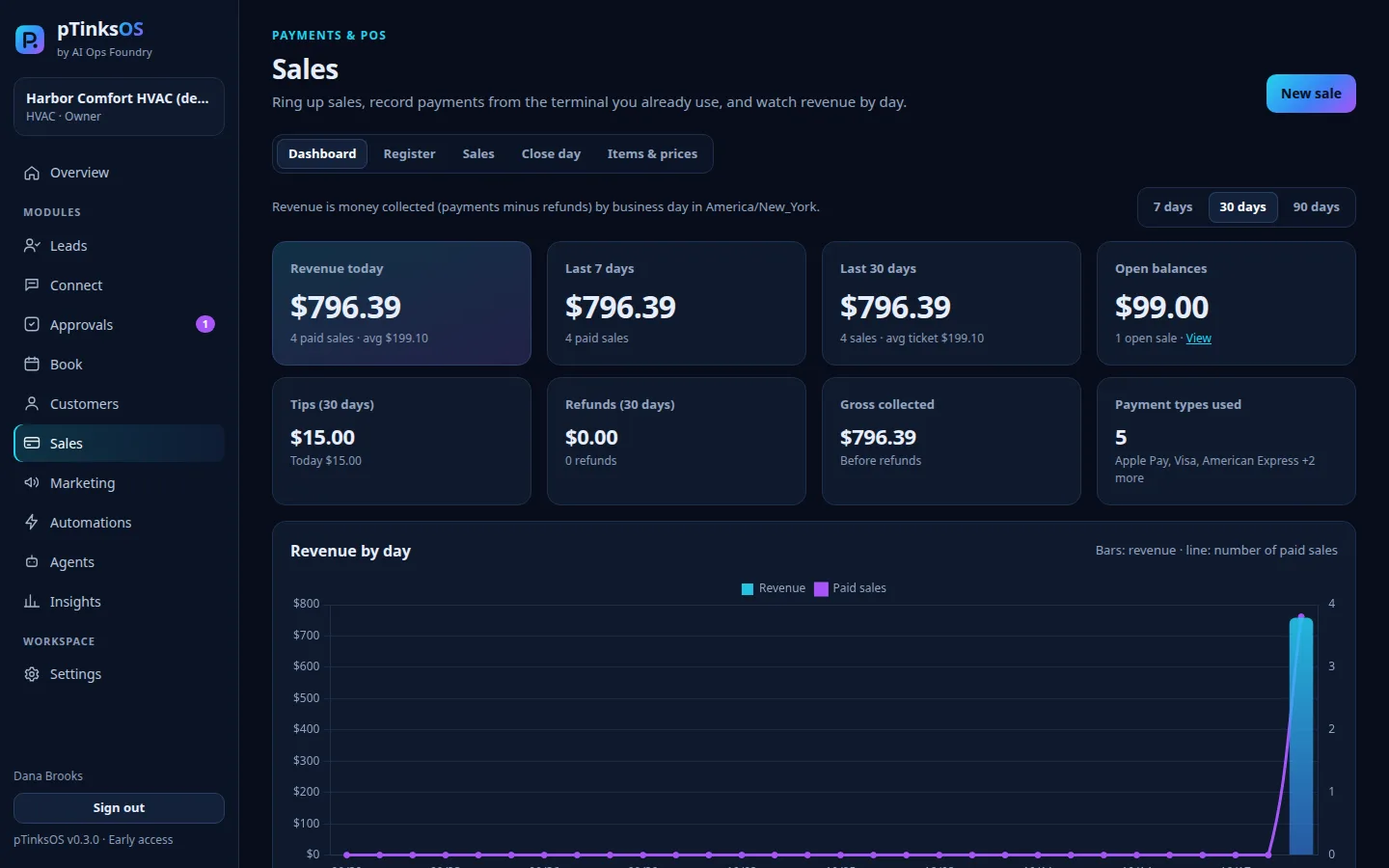
  • Keep your terminal. Take payment on Square, Stripe, Clover, PayPal or cash as you do today, then record it in seconds.
  • No card numbers stored. pTinksOS keeps only the last 4 digits.
  • Manager controls. Refunds, voids and the daily cash close need an owner or manager.
pTinksOS Sales dashboard with revenue today, last 7 and 30 days, open balances, tips, refunds, payment types and a revenue-by-day chart
The Sales dashboard in a demo workspace with sample data.
Register

A register built for service businesses.

Tap services and products, add a custom line, apply a discount or tip, and pTinksOS works out the tax. Split one bill across card, wallet and cash, with change calculated for you.
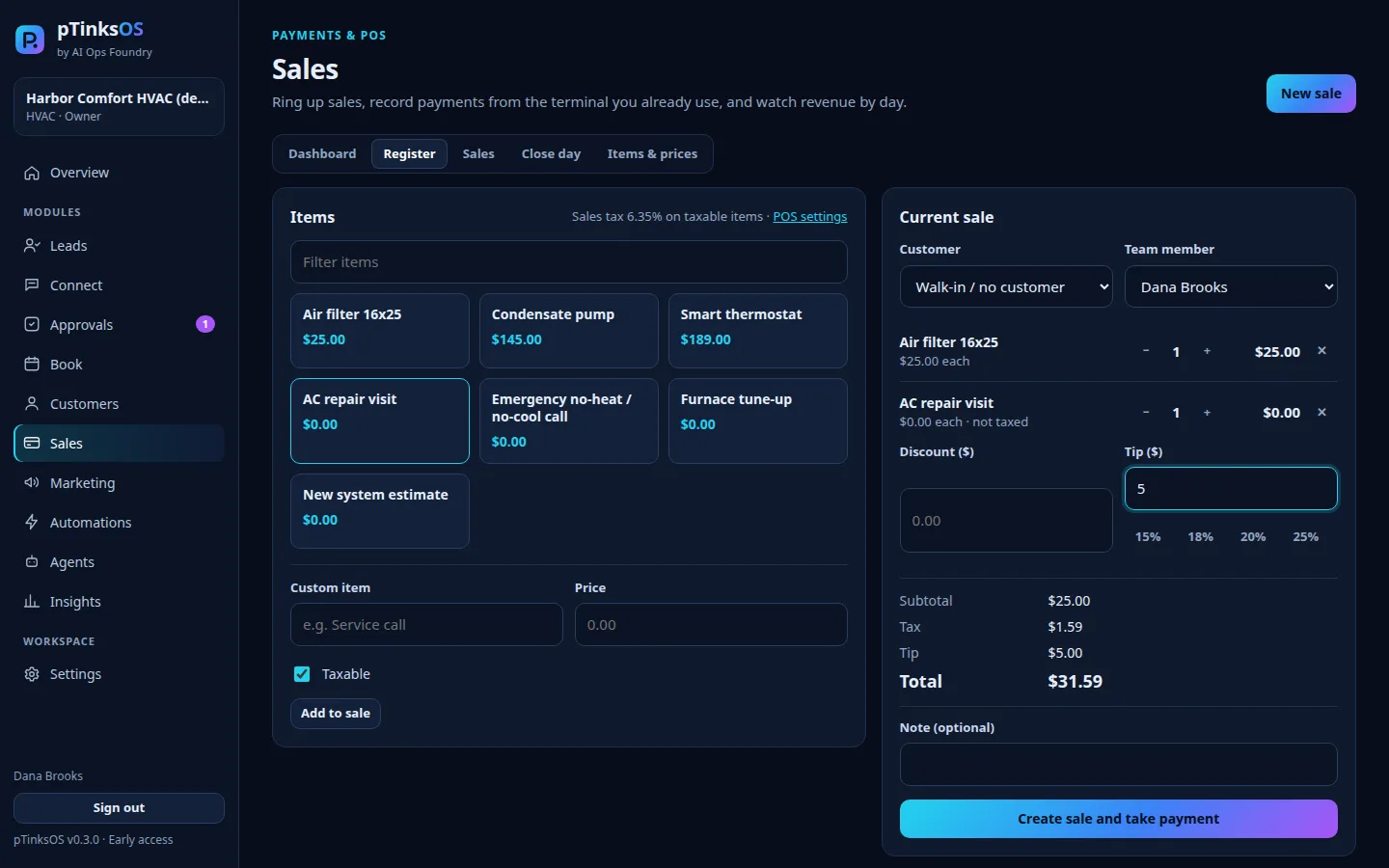
pTinksOS register with service and product buttons, a current sale with two items, tip, tax and total
The pTinksOS register in a demo workspace.
On your phone

Works where you work.

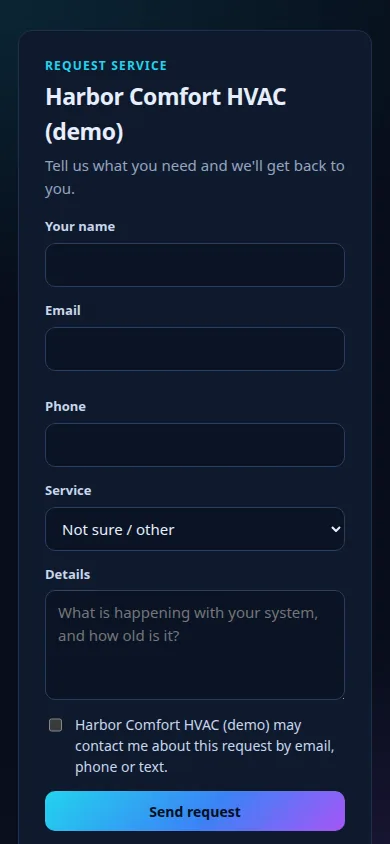
Approve a reply from the truck or between clients. Customers use your request link from any phone.
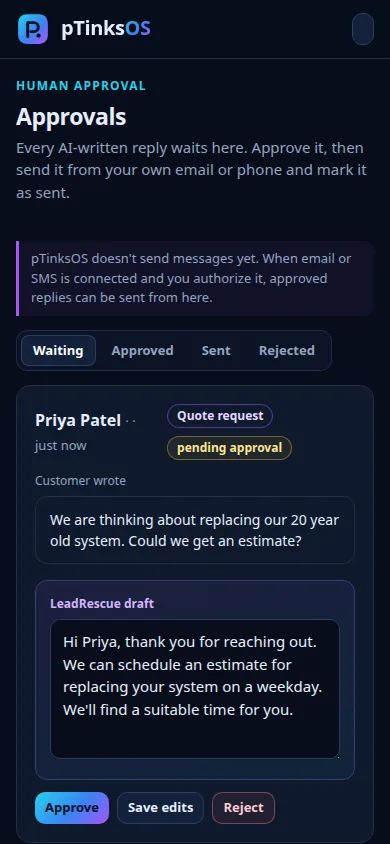
pTinksOS Approvals on a phone showing a customer question and the LeadRescue draft
A business's pTinksOS request form on a phone with name, email, phone, service, details and a consent checkbox
Built for your trade

Set up for your industry in minutes.

Pick your industry and pTinksOS starts you with typical services, durations and hours you can edit. Here's what LeadRescue does with real-world messages.

HVAC

The no-heat call at 6 PM

“No heat and the house is freezing” is flagged as an emergency and moved to the top, with a reply drafted that asks them to call now.

Plumbing

Leaks before quotes

Burst-pipe and leak messages are flagged high priority, while water-heater quote requests are labelled and queued for an estimate.

Electrical

Safety first

Sparking outlets and outages are surfaced immediately. Panel upgrade questions get a draft that collects the details you need.

Landscaping

Seasonal rush, handled

Spring cleanups and mowing requests come in through your request link, each with a service, notes and a follow-up date.

General contractors

Estimates that don't slip

Remodel inquiries are labelled as quote requests with follow-up reminders, so no estimate request is forgotten.

Tattoo and piercing studios

Requests the artist approves

Clients send their idea, placement, size and reference images with a signed consent and release. The artist approves each request, and closed books show a "notify me when books open" list.

Barbershops and salons

Reschedules without the back-and-forth

“Can I move Thursday?” is labelled a reschedule with a polite draft, and the chair schedule blocks double-bookings.

Pricing

Simple plans. No added processing fees.

Every plan includes multi-factor sign-in, human approval for AI messages, opt-in text reminders for your customers and all the payment types above. Use the card terminal and payment apps you already have.

Early access is free. Billing isn't active yet, no card is collected, and you'll be asked before any paid plan starts. Founding member offer: join during early access and get 50% off your first 6 months on any paid plan once billing starts.

Salons and barbershops

Solo

For independent stylists and barbers

$29/month

or $24/month billed yearly

1 user

  • Leads, booking and request form
  • POS and daily sales dashboard
  • LeadRescue AI replies (you approve)
  • Client marketing: 500 emails a month
  • 3 automations
Most popular

Studio

For growing shops with a small team

$59/month

or $49/month billed yearly

Up to 5 staff · +$10 per extra staff member

  • Everything in Solo
  • Split payments and tips by staff
  • Review Booster, Rebooking and Reminder agents
  • Client marketing: 2,500 emails a month
  • 25 automations

Salon

For busy salons with front-desk staff

$129/month

or $109/month billed yearly

Up to 15 staff · +$8 per extra staff member

  • Everything in Studio
  • Daily Briefing agent and staff performance
  • Client marketing: 10,000 emails a month
  • Up to 100 automations
  • Priority support

Tattoo and piercing studios

No booking fees for your clients and no added processing fees.

Artist

For independent tattoo artists and piercers

$35/month

or $29/month billed yearly

1 user

  • Tattoo and piercing request forms with reference images
  • Digital consent and release with typed signature
  • Books open or closed, with a notify-me list
  • Artist approval for consultations and bookings
  • Deposit tracking and aftercare instructions
  • Client marketing: 500 emails a month
  • 3 automations
Most popular

Studio

For studios with a few artists and piercers

$89/month

or $74/month billed yearly

Up to 5 artists · +$15 per extra artist

  • Everything in Artist
  • Guest booking or client accounts
  • Split payments and tips by artist
  • Review Booster, Rebooking and Reminder agents
  • Client marketing: 2,500 emails a month
  • 25 automations

Collective

For busy shops with a front desk

$179/month

or $149/month billed yearly

Up to 12 artists and staff · +$12 per extra

  • Everything in Studio
  • Daily Briefing agent and artist performance
  • Client marketing: 10,000 emails a month
  • Up to 100 automations
  • Priority support

Contractors and home services

Solo

For owner-operators

$49/month

or $39/month billed yearly

1 user

  • Leads, booking and request form
  • POS and daily sales dashboard
  • LeadRescue AI replies (you approve)
  • Client marketing: 500 emails a month
  • 3 automations
Most popular

Crew

For small crews running several jobs a day

$129/month

or $109/month billed yearly

Up to 5 users · +$25 per extra user

  • Everything in Solo
  • Split and partial payments
  • Review Booster, Rebooking and Reminder agents
  • Client marketing: 2,500 emails a month
  • 25 automations

Pro

For established shops with an office team

$249/month

or $209/month billed yearly

Up to 10 users · +$20 per extra user

  • Everything in Crew
  • Daily Briefing agent and crew performance
  • Client marketing: 10,000 emails a month
  • Up to 100 automations
  • Priority support

Prices in US dollars. Opt-in text reminders start sending once our texting number finishes carrier registration; text-message marketing comes later. Annual billing saves about 17%.

Questions

Good to know.

Does pTinksOS send messages to my customers automatically?
No. LeadRescue only writes drafts. An owner or manager approves each one, and today you send approved replies from your own email or phone. Connected email and text sending will need your explicit setup and permission.
Who can see my business's data?
Only the people you invite to your workspace. Each business is separated on the server, and every action is recorded in your audit log.
What if the AI gets something wrong?
That's why every draft waits for a person. LeadRescue uses only the business facts you provide and never promises prices, discounts or appointment times on its own.
Does pTinksOS process card payments?
Not directly. You keep taking payments on your current terminal or app (Square, Stripe, Clover, PayPal, Venmo, Cash App Pay or cash) and record them in pTinksOS. Direct connections to those providers are planned and will only switch on when you set them up.
Will marketing messages go to everyone in my customer list?
No. Only customers who opted in for that channel, with a recorded reason such as an in-person or written agreement. Unsubscribed customers are always left out, and each campaign needs owner or manager approval.
Can I protect my account with two-step verification?
Yes. Turn it on in Settings › Security with any authenticator app. Owners can require it for everyone on the team.
Does it send texts and emails for me?
Booking confirmations, reminders and sign-in codes are emailed once you turn on email sending. Customers can also tick "Text me a reminder" when they book: one reminder text per appointment, never required, and they can reply STOP at any time. Those texts start once our texting number finishes carrier registration. LeadRescue replies are still drafts that you approve and send from your own email or phone.
Where do my customers book?
On your own page at reserved4u.app/your-business. Older booking links on app.aiopsfoundry.ai still forward there. You and your team keep signing in at app.aiopsfoundry.ai.
Can customers book without creating an account?
Yes, if you turn on guest booking. Guests confirm their email with a one-time code and get a link to view or cancel their booking. Customers who prefer an account can still sign in to see all their visits.
Does it connect to my calendar?
Customers and your team can add appointments to Google, Apple or Outlook calendars, and each team member can subscribe to a private calendar feed. Two-way Google Calendar and Microsoft 365 sync is planned.

Screenshots show the working pTinksOS app with a demo workspace and sample data. pTinksOS is in early access, so features may change.

EVERY FRIDAY

AI Ops Foundry Weekly

Get practical AI automation tutorials, proven workflows, tools, and implementation guides delivered to your inbox every Friday.

Free. You'll get a confirmation email first. Unsubscribe anytime. See our privacy policy.